

/fdata%2F5016695%2Favatar-blog-1266450339-tmpphpnXZ5LS.jpg)

A new trick for today: You do not need to download an image in order to edit it in GIMP... In version 2.8, you have a direct command to open an online picture: From the "File" menu, select "Open Location..."
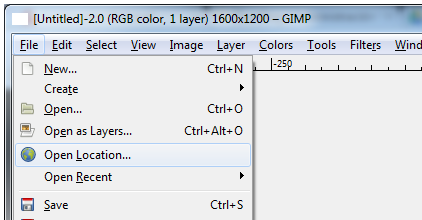
The only conditions are that the link must point to a picture (not to a flash frame, for example). Then, you have to have access to the picture, of course.
So, go to your favourite browser, find a nice picture, right-click and select "Copy Location", or "Copy Link", or "Copy URL"... this, depending on your browser.
Then, in GIMP, paste the link directly in the dialog window - GIMP will connect to the web server, download a local version for you and open it for edition... This is great to avoid downloading to temporary folders, or to work in public computers without leaving much behind...